
Your Wi-Fi adapter does not support AP mode
When you click Start hotspot in Wi-Fi hotspot or Wi-Fi repeater mode, Connectify Hotspot may show this error at the top of the window:
Could not start the hotspot because of a problem with this PC's network adapters:
Your Wi-Fi adapter does not support AP mode. Please try updating the drivers for your Wi-Fi adapter (Network adapter problem (CF100FFF))

Launch Help in the error opens this article.
What the error means
Connectify Hotspot found your Wi-Fi adapter, but Windows reports that it can't host a hotspot (also known as AP mode). Connectify Hotspot can create a hotspot in two ways: with Wi-Fi Direct, which it uses by default, or with Microsoft Hosted Network. This error means your adapter's driver supports neither of them. If it supports either one, the hotspot can start.
Connectify Hotspot only uses Wi-Fi Direct on your PC. What it creates is a regular Wi-Fi hotspot, and your devices don't need to support Wi-Fi Direct to join it. Turning Settings > Network > Wireless > Prefer Wi-Fi Direct on or off does not fix this error, because neither way is available.
If the error says Connectify Hotspot can't find a Wi-Fi adapter at all, see Connectify Hotspot does not detect a Wi-Fi Adapter instead.
Try updating the wireless drivers on your device
Please be sure to check that you have the latest drivers installed for your wireless device by visiting the wireless card manufacturer's website or the computer manufacturer's website. Restart your PC after updating, then click Start hotspot again. Learn more about how to update your Wi-Fi drivers here: How to update your wireless (Wi-Fi) driver.
You can check your driver's version and date by opening the command prompt and entering the following command:
netsh wlan show drivers
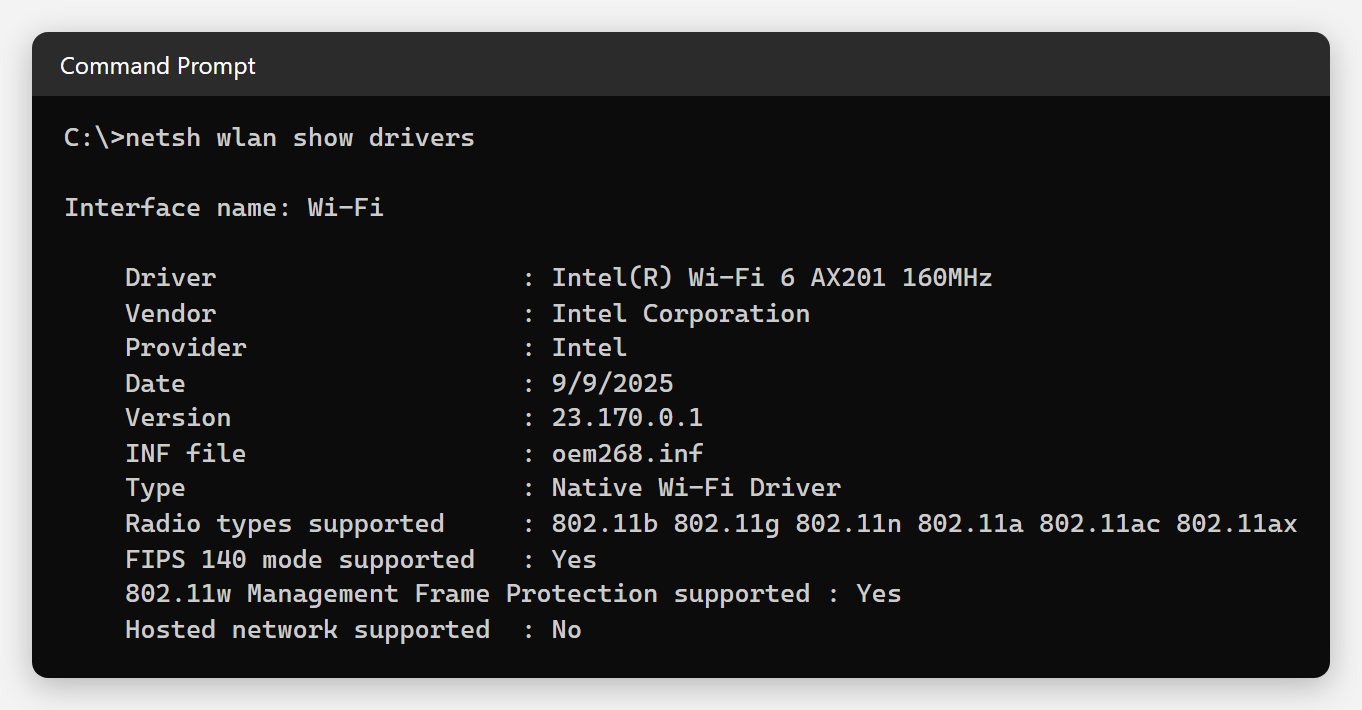
Don't worry if this shows Hosted network supported : No. Many current Wi-Fi adapters don't support Hosted Network, and Connectify Hotspot uses Wi-Fi Direct with them instead. The Marvell AVASTAR adapter in older Microsoft Surface tablets is one of them.
Or: use a USB Wi-Fi adapter
If no driver update helps, your Wi-Fi adapter can't host a hotspot. A USB Wi-Fi adapter that supports AP mode will work with Connectify Hotspot. These adapters are usually cheap and widely available. Without a suitable Wi-Fi adapter, you can still share your internet over Ethernet with Wired router (Hotspot PRO or MAX).
Notes
Connectify Hotspot 27 needs 64-bit Windows 10 version 1703 (the Creators Update) or later, or Windows 11. See What Operating Systems does Connectify Support?